Categories
Jargons

How to Change Mobile Number in Aadhaar Card?

The Aadhaar card has become essential for accessing various services and verifying documents. To fully utilise the online features associated with Aadhaar, it is crucial to register your mobile number with the Unique Identification Authority of India (UIDAI). In this article, learn how you can change the mobile number linked to your Aadhaar card.

A registered mobile number is necessary to receive one-time passwords (OTPs) for authentication and use the mAadhaar app. If you need to change the mobile number linked with your Aadhaar card or your previously registered number is no longer valid, simply visit an Aadhaar Enrolment Centre. ​​Changing the mobile number associated with your Aadhaar card cannot be done online.

Here’s How You Can Change Mobile Number in Aadhaar Card?

Follow the easy steps below to change the mobile number on your Aadhaar Card:

  • Step 2: Request the Aadhaar executive for an Aadhaar Correction Form and fill it out.
  • Step 3: Submit the form to the authorised officer
  • Step 4: Pay the Aadhaar demographics update fee of Rs 50.
  • Step 5: You will receive an acknowledgement slip with an Update Request Number (URN), which will help you track the status of your update request.
  • Step 6: The mobile number update in Aadhaar will be complete within 30 days.

How to Check Mobile Number Update Status in Aadhaar Card

Given below are the simple steps to check the status of your mobile number update request:

  • Step 2: Input the URN that you received in the acknowledgement slip. Alternatively, you can input Service Request Number (SRN) or Enrolment ID (EID) to track the status.
  • Step 3: Enter the captcha and click on “Submit”.
  • Step 4: You will see the status of your update/mobile number change request.

How to Verify Aadhaar Card Mobile Number Online

There are two methods to verify the mobile number linked with your Aadhaar:

Method 1: Using verify email/mobile number option

  • Step 2: Navigate to ‘MyAadhaar menu’ and click on ‘verify email/mobile number’ under ‘Aadhaar Services’.
  • Step 3: Choose the verify mobile number option.
  • Step 4: Enter your Aadhaar number and registered mobile number.
  • Step 5: Enter the captcha and click on “Send OTP”.

If the mobile number you entered is linked to your Aadhaar in UIDAI’s database, a popup will be displayed saying the mobile number is verified. If it isn’t linked to your Aadhaar, the popup will say that the mobile number does not match UIDAI’s records.

Method 2: Using verify Aadhaar number option

  • Step 2: Navigate to ‘MyAadhaar menu’ and click on ‘Verify Aadhaar Number’ under ‘Aadhaar Services’.
  • Step 3: Enter your Aadhaar number.
  • Step 4: Enter the captcha and click on ‘proceed & verify Aadhaar’.

On the screen, you will see your personal details, including your Aadhaar number and registered mobile number. From this screen, you can verify your registered mobile number.

Why Should You Link Mobile Number with Aadhaar?

To use all Aadhar services, it’s necessary to link your mobile number with Aadhaar. Here are some of the vital services offered by UIDAI/Aadhaar:

  1. All online Aadhaar facilities
  2. Pancard application (new/reprint)
  3. Digilocker
  4. mAadhaar App
  5. Mobile re-verification
  6. Mutual Find linking with Aadhaar
  7. Umang App
  8. Online EPF claims and withdrawals

In short, linking the updated mobile number with your Aadhaar is simple and easy. However, if you haven’t linked any mobile number to Aadhaar, check out our article on how to easily link Aadhaar to your mobile number.

Categories
Jargons

How to Link Aadhaar With Mobile Number/OTP Online?

Aadhaar, the world’s largest biometric identification system, has become a crucial part of our daily lives. The Unique Identification Authority of India (UIDAI) issues the unique 12-digit identification number using your biometric and demographic data. In this article, we explain how you can link your Aadhaar with a mobile number.

Linking Aadhaar with a mobile number enhances security and provides easy access to essential services and the digital economy. It simplifies various government service verification processes and supports the Aadhaar eSign infrastructure. Failure to link Aadhaar with a mobile number may lead to the disconnection of mobile services, as mandated by the government.

How to Link Aadhaar with Mobile Number Online

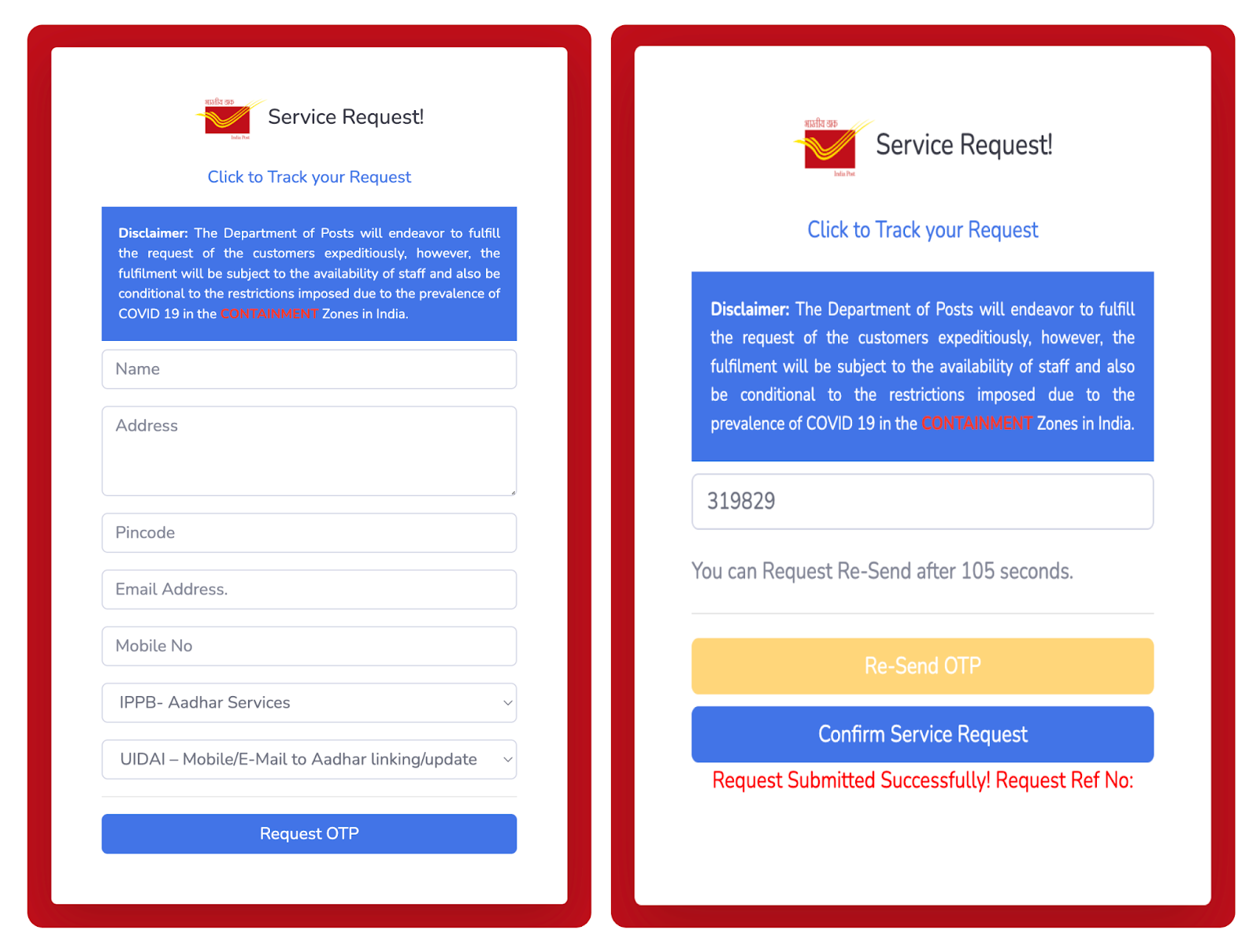
You can link Aadhaar with a mobile number on India Post’s website in 10 easy steps:

Step 1: Visit India Post’s website

Step 2: Enter basic details like name, address, mobile number, and email address.

Step 3: Select ‘IPPB – Aadhaar Services’ as the service from the drop-down menu.

Step 4: Select ‘UIDAI – Mobile/Email to Aadhaar linking/update’ as the sub-category.

Step 5: Once all the required details are filled in accurately, click the ‘Request OTP’ button.

Step 6: On the next screen, enter the OTP received on your mobile number.

Step 7: Click on ‘Confirm Service Request’. Then, you will receive a Reference Number that allows you to track the status of your application.

Step 8: Once your submission is successful, the request will be forwarded to the nearest post office to your address

Step 9: An officer designated for Aadhaar update/linking will conduct the verification process. The officer will visit your address and use a mobile biometric device (for iris scans, fingerprints, and photographs) to perform the verification process.

Step 10: Upon completion of the update/linking process, the officer will charge you a service fee of ₹50.

Post office aadhar linking

How to Link Aadhaar with Mobile Number Offline

You can link your Aadhaar with a mobile number offline by visiting the nearest Aadhaar enrolment centre or the local office of your telecom operator.

How to Link Aadhaar with Mobile Number by Visiting an Aadhaar Enrolment Center:

Step 1: Locate and visit a nearby Aadhaar Enrolment Center.

Step 2: If you haven’t already enrolled for Aadhaar, enter your mobile number in the Aadhaar Enrolment Form to link your Aadhaar with your mobile number. If you have already enrolled for Aadhaar, link/update your phone number by filling out the Aadhaar Correction Form.

Step 3: Submit the correctly filled form to the authorised officer.

Step 4: Provide your biometrics (iris & fingerprints) for authentication.

Step 5: You will receive an Acknowledgement slip, which includes an Update Request Number (URN) that can be used to track the progress of your Aadhaar update. You can track the progress by dialling UIDAI’s toll-free number: 1947.

Step 6: Click on ‘Confirm Service Request’. You will get a Reference Number that can be used to track the status of your application.

Step 7: Aadhaar reprint is not necessary after updation.

Step 8: Once the process is complete, you will begin receiving OTPs for all Aadhaar services.

How to Link Aadhaar with Mobile Number by Visiting Telecom Operator’s Office:

Step 1: Locate and visit your nearest Telecom operator’s office.

Step 2: Provide the authorised officer with a self-attested copy of your Aadhaar card.

Step 3: Provide the executive with your mobile number and Aadhaar details.

Step 4: Use the re-verification application to generate a 4-digit OTP, which will be sent to your mobile number.

Step 5: Submit the OTP to the executive and provide biometrics.

Step 6: You will receive a confirmation SMS after 24 hours. Reply “Y” to complete the e-KYC process.

Charges to Link Aadhaar with Mobile Number

A fee of ₹50 (inclusive of GST) is applicable for all types of demographic data updates, whether you do it offline or online. However, you do not have to pay any charges when you enrol for Aadhaar initially. To stay informed about the latest charges for Aadhaar-related services, you can review the UIDAI Fee Structure.

Benefits of Linking Aadhaar with Mobile Number

Here are some of the benefits of linking Aadhaar with a mobile number:

  1. Identity verification: Linking Aadhaar with a mobile number helps to confirm the authenticity of the user. It adds an extra layer of identity verification, which prevents others from impersonating you.
  2. Aadhaar E-sign: Aadhaar eSign is a method of digitally signing a document using an Aadhaar. Documents affixed with Aadhaar-based eSignatures have a legal value equivalent to that of hand-written signatures. eSign is used by the National Securities Depository Ltd (NSDL) for authentication requests related to trading and Demat accounts.
  3. Easy access to Government services: Many government subsidies, welfare schemes, and services require Aadhaar-based verification. By linking Aadhaar with a mobile number, individuals can easily avail of these services without the need for separate documentation.
  4. Seamless Digital Transactions: Aadhaar-linked mobile numbers enable individuals to participate in the digital economy more easily. It facilitates digital transactions, e-commerce, and online services, making it convenient to engage in various digital platforms.
  5. Enhanced security: Aadhaar-based mobile verification enhances the security of mobile communications. It helps prevent unauthorised access to mobile services and reduces the risk of identity theft or SIM card fraud.
  6. Efficient communication: Linking Aadhaar with a mobile number ensures that individuals receive important communication from government authorities, service providers, and financial institutions promptly. It helps in delivering important updates, alerts, and notifications directly to the linked mobile number.
  7. Streamlined Processes: Linking Aadhaar with mobile numbers simplifies the process of availing various services. It eliminates the need for separate identity verification during service enrollment or subscription. This saves time and effort for both individuals and service providers.

In conclusion, linking Aadhaar with a mobile number streamlines processes enhances security, and contributes to a more inclusive and digitally empowered society. It helps confirm your identity as an Indian citizen and allows the government to verify your information!